System overview and installation starter manual
# Cover
* Product/System Name Logo
* Document Title: << System Overview & Installation Starter Manual >>
* Applicable product/system version
* Document version number (e.g., v1.0)
* Release date
* Company Name & Logo
# Document revision records
| Version number | Revision date | Summary of revisions | Reviser | Reviewer |
| --- | --- | --- | --- | --- |
| v1.0 | YYYY-MM-DD | Initial release | Name | Name |
# Table of contents
# Preface
## Purpose of the document:
* Provide an overview of the overall cognition, component composition and installation process of the system, so that readers have a basic understanding of the system, please refer to the more detailed operation manual according to the specific operation.
## Target Audience:
* Project manager
* IoT O&M personnel, IT facility O&M personnel
* Field engineer
* Anyone who needs a quick overview of the system
## Document Scope:
### What's included:
* System Overview
* Introduction to system architecture and components
* Introduction to the system deployment process
* System deployment prerequisites
* System deployment security considerations
### Contains no content
* Detailed steps to install the software
* Detailed steps for hardware installation
* Steps to use system functions
## Related Documentation:
* Software Installation and Configuration Manual - Software Installation Guide.
* Hardware Connectivity and Deployment Manual - Hardware Installation and Wiring Guide.
* Product Positioning Manual - Guide to positioning the actual position of the product.
* Product Import Manual - Gateway and Terminal Import System Guide.
* Software User Operation and System Administration Manual - System Usage Guide.
* Release Manual - System Version Change Information.
* FAQ & Troubleshooting Manual - Solutions to common problems.
* Gateway Manual - Gateway Technical Parameters and Operation Guide.
* "End Product Manual" - Technical parameters and operation guide of end products.
## Conventions and Symbols:
* i️ Tip information
* ⚠️ Warning
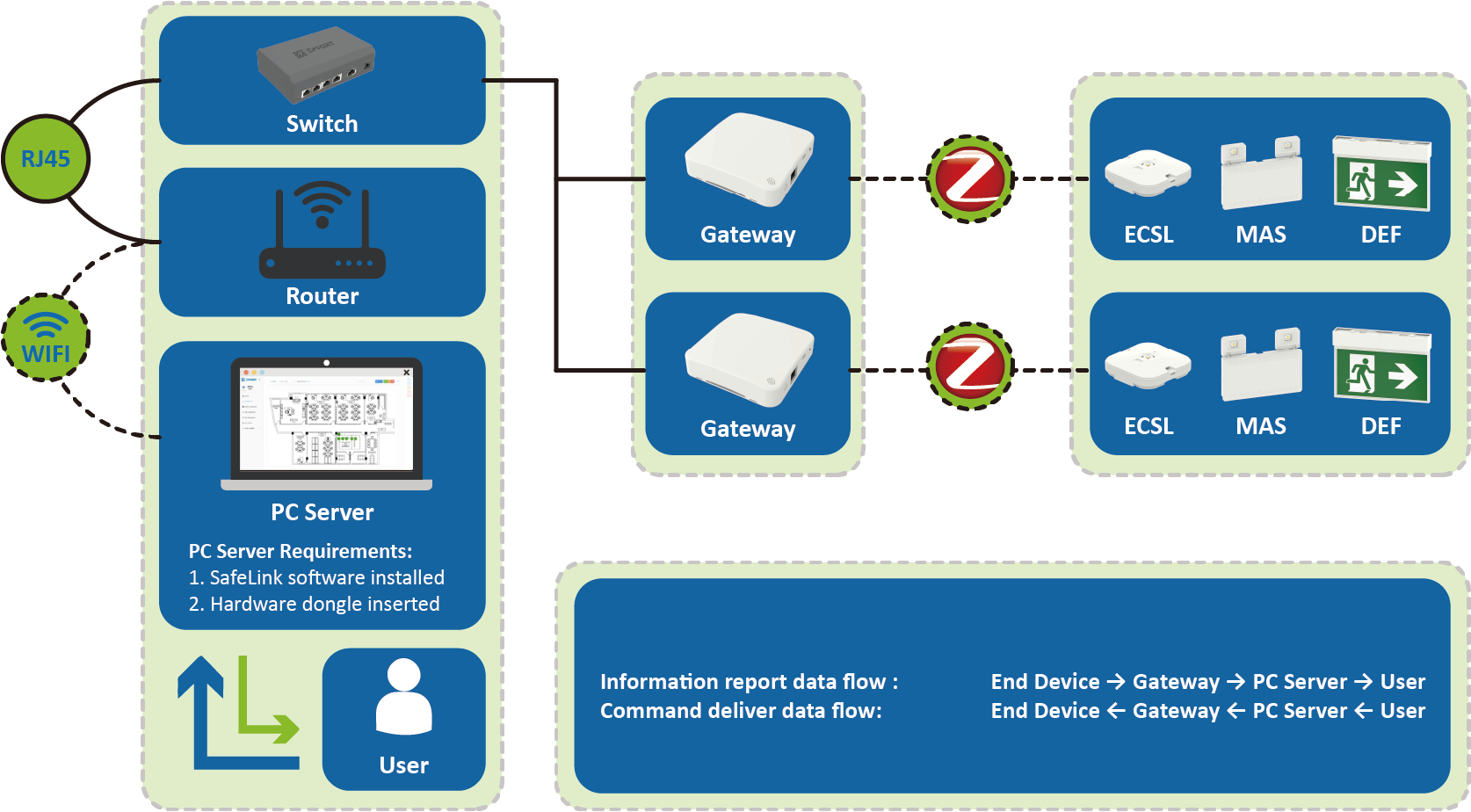
# System Overview
## System Introduction:
SafeMesh-ZigBee intelligent IoT management and control system is an intelligent IoT solution based on ZigBee wireless communication protocol and Internet technology, which adopts a three-level architecture system of server-gateway-terminal to realize the global intelligent management of emergency lighting equipment. Through three core function modules: server-side collaborative control, real-time monitoring of device status, and intelligent policy configuration, the system supports real-time query of device status, scheduled self-test policy setting, and remote switching of always-on mode to meet the intelligent management and control requirements of different scenarios. Combined with the O&M analysis report generated by the system, the O&M labor cost is reduced by 60% compared to the traditional management mode, effectively improving the efficiency of equipment management.
## Core application scenarios:
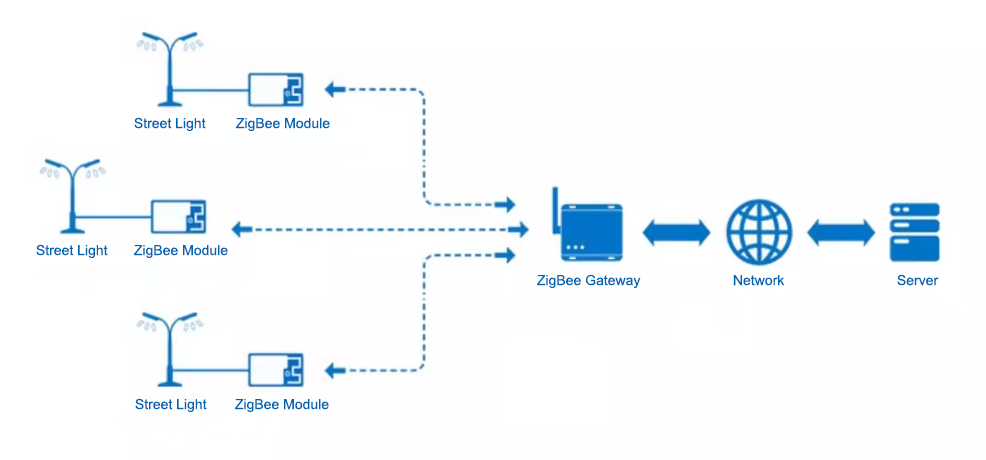
* Intelligent street light management system
## System Advantages and Features:
* ZigBee wireless mesh networking technology is used to achieve stable real-time communication under high-pitch deployment, which is more suitable for the field of emergency lighting
* Provide flexible and convenient diversified installation methods to meet the needs of different scenarios
* Localized deployment: Data security is autonomous, avoiding the risk of leakage and resisting hacker attacks
# System architecture and core components
## **Overall system architecture diagram:**
## Core Components Introduction:
### **SafeMesh Software:**
* Name: SafeMesh Emergency Management Platform.
* Brief description of key functions
* Data Large Screen - Multi-dimensional visual display of device operating status
* Real-time luminaire control - supports instant control operations such as remote switching and flashing of lamps for single lights
* Real-time condition monitoring - Dynamically captures and displays the operating status of each luminaire
* Map engine - Bidirectional mapping of the physical location of the device and the interface relationship
* Smart Timing Test - Automated emergency lighting system reliability verification
* Run analysis reports - Output detection results and fault reports for the entire cycle
* Running location requirements: Installed on an enterprise internal server or dedicated computer that meets the hardware requirements.
### **Gateways:**
* Name: EIC-GW01-IOT/ZB Gateway
* Key features in brief:
* Terminal data aggregation - Real-time collection of status information of all terminal devices in the jurisdiction
* Server-side communication broker - Uploads aggregated data encryption to the server
* Precise Command Distribution - Parses server-side instructions and routes them to the destination endpoint
* Deployment Location: Deployed at the end device site.
### **Terminals:**
* Key features in brief:
* Terminal status report
* Functional/lifetime testing
* Functional/lifetime test entry time, duration setting
* Positioning flashes
* Always-on switch switching
* For detailed technical specifications and parameters, please refer to the "Terminal Product Specification"
# Overview of the installation process
## Panorama of the installation process:
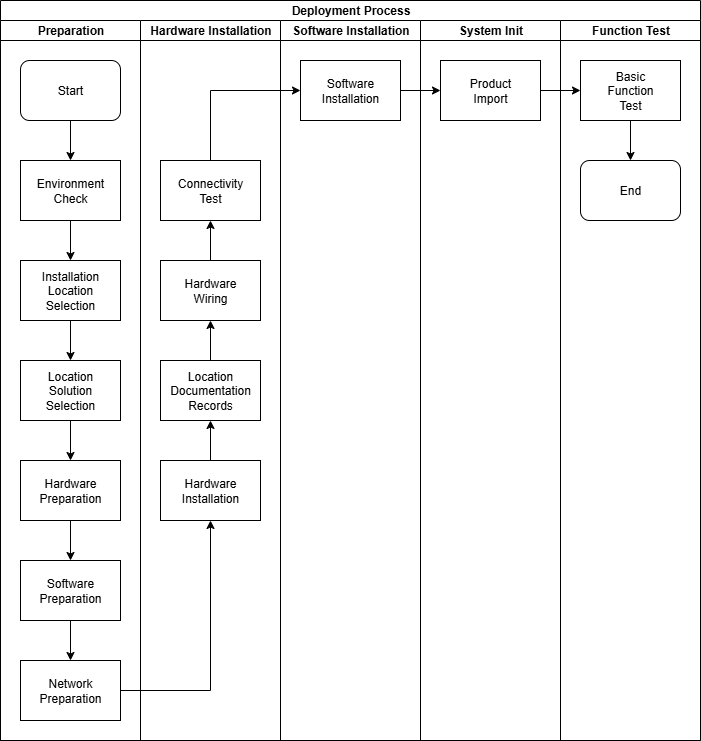
## Installation process stage description:
### Preparation stage
* Goal: Prepare the environment, tools, network, and installation plan required for system deployment
* Responsible person: project leader
* Main input: System installation prerequisites
* Main output: The environment, tools, network, and installation scheme required for system installation have been evaluated, and it is confirmed that the site can be deployed
* Key dependencies: None, the first step in deployment
* Reference: System Overview and Installation Starter Manual
### Hardware installation phase
* Goal: The hardware part of the system is installed, the location information is recorded in the document, and the connectivity test is conducted
* Responsible person: on-site engineer
* Primary input: A list of hardware that the system needs to install
* Main output: the hardware part of the system is installed and tested
* Critical dependencies: The system preparation phase is complete
* Reference Document: Hardware Connection and Installation Manual
### Software installation stage
* Goal: Complete the installation of the software part of the system and perform login tests
* Responsible person: on-site engineer
* Main input: A list of software that needs to be installed on the system
* Main output: The software part of the system is installed
* Critical dependencies: The system preparation phase is complete
* Reference: Software Installation and Configuration Manual
### System initialization stage
* Goal: Import the product into the system and view it on the system
* Responsible person: on-site engineer
* Primary input: Installed SafeLink system
* Main output: The system product import is completed and can be viewed on the server
* Key dependencies: the system hardware installation stage and software installation stage are completed
* Reference: Product Import Manual
### Functional testing phase
* Objective: Verify that the system deployment is successful
* Responsible person: on-site engineer
* Primary input: Initialize the completed SafeLink system
* Main output: The basic function of the system has passed, and the user can start to use it officially
* Key dependencies: The system initialization phase is complete
* Reference: Software User Operation and System Administration Manual
# Deployment prerequisites
## **System Recommended Configuration:**
* Server CPU: Intel® Core™ i5-6400
* Server RAM: 8G
* Server storage: 128G
* Server OS: Windows 11 - 64bit
## **System Operation Requirements:**
* Operating Environment/Dependent Software:
1. Nodejs
2. Mysql
3. Vikey
4. Microsoft Visual C++ Redistributable i️ The above environments are automatically installed when the system is installed, and users do not need to install them themselves.
* Permissions: Administrator permissions are required for installation.
## Network Requirements:
* Network Ports:
| ports | agreement | Uses: | Firewall requirements |
| --- | --- | --- | --- |
| 3000 | TCP | server | Inbound/outbound is allowed |
| 3547 | UDP | MQTT communication | Inbound/outbound is allowed |
| 3548 | UDP | OTA upgrades | Inbound/outbound is allowed |
| 8012 | TCP | client | Inbound/outbound is allowed |
| 8189 | TCP | Dongle driven | Inbound/outbound is allowed |
| 13306 | TCP | database | / |
i️ The above ports are required for the system, please note port conflicts
⚠️ Firewall requirements need to be manually configured by the user
* Network stability requirements: It is recommended to have a delay of <30ms and a packet loss rate of 0%.
## Environmental Requirements:
### **Gateway deployment environment:**
* Ambient temperature from -20°C to +55°C
* Dry and dust-free
* 220V±10% Euro Socket
* There are no metal obstacles around the gateway
### **Terminal Deployment Environment**:
* Ambient temperature from -20°C to +55°C
* Dry and dust-free
* 220V±10%
* There are no metal obstacles around the terminal module
## **Required information:**
If the customer needs our company to provide project installation feasibility assessment services, the following information needs to be provided to evaluate whether the project can be installed smoothly, how many gateways are needed, and whether the distance between equipment is met.
* The total number of equipment in the project
* The total floor of the project
* Project CAD drawing
## Personnel skill requirements:
Field personnel should have the following foundational skills:
* Hardware installation experience
* Experience in operating system installation/management
* Experience with network installation/configuration
* Experience reading technical documentation
# Safety precautions
## Physical Security:
* Install the gateway device in a secure location that is not easily physically touched or destroyed.
* Ensure that servers/computers are placed in a secure computer room with access control.
## Account security:
* ⚠️ All **default usernames and passwords must be changed immediately** after the first login to prevent data breaches.
## Cybersecurity:
* Configure firewall rules according to the 5.3 Network Requirements section.
* Isolate your company's mainnet network from your SafeLink network.
## Software & Firmware:
* Confirm that the software/firmware used for the installation is an officially provided version that has not been tampered with.
## Document Confidentiality:
* Keep installation profiles that contain sensitive information (e.g., passwords, IP addresses) safe.
# Technical Support & Resources (SafeMesh has no content, for follow-up)
## Get help:
* Technical Support Portal URL
* Supported email addresses
* Support phone/hotline number
* Working hours
* Online community/forum links
## Quick Links:
* Provide the online document library URL if the document is online.
* List **direct download links** or find locations for all core documentation (such as product documentation download pages). (All the document name links mentioned earlier must be included here!) )
* [Software installation and configuration manual](http://13.222.61.26:6875/books/safemesh/page/iii "软件安装与配置手册")
# Appendix (SafeMesh has no content, for subsequent use)
* System Component Diagram (Detailed): A more detailed architecture diagram or more equipment photos can be placed.
* Typical deployment scenarios (extended version): Provide more diagrams or descriptions of the application scenarios.
* License activation brief: If license activation is part of the deployment and the process is simple, it can be briefly described here. Otherwise it points to the installation manual.
