
A.quick pairing instructions for master converters
SafeLUX User Manual for Quick Pairing Instructions For Master Converters
This document is the user manual for the quick pairing instructions for master converters of the SafeLUX system
Version:V1.0
Release time:November 24, 2025
Publisher:EFFORT
Document modification record
| Version | Date | Modified content | Modifier |
|---|---|---|---|
| V1.0 | 20251210 | First creat | Mihcael |
1. Functional Description
Through this document, you can learn how the host and master converter perform quick network pairing without entering the master converter’s UUID on the host web page to add the master converter.
2. Usage requirements
The host and the master converter are in the same local area network (LAN).
:warning:The host and the master converter cannot be directly connected via an Ethernet cable.
3. Principle Introduction
1.If you want to add a master converter to the host system for operation, you need to manually enter the master converter’s UUID on the host web page and set the host’s IP address for the master converter at the same time.
2.If the host and the master converter are on the same network segment, the host will periodically send multicast messages which contain the host’s IP address. When the master converter receives the multicast messages, it will return its own UUID to the host. This enables automatic pairing to be completed.
3.The Network segment address encoders on the host and the master converter can be used to modify the multicast address. This ensures that if there are different hosts on the same network segment, multicast messages will not conflict. The converters to be bound to Host A and Host A itself must both dial the Network segment address encoders to the same digital group. The converters to be bound to Host B and Host B itself must both dial the Network segment address encoders to another same digital group different from that of Host A.
4. Usage steps
4.1 Set the network segment address encoders of the host
4.2 Set the network segment address encoders of the master converter
4.3 Power on & Log in to the Host Web Control Page
Power on & Log in to the Host Web Control Page.
4.4 Wait for the system prompt and click on it
Wait for the system prompt to appear.
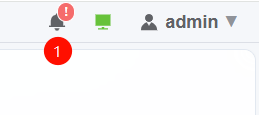
System Prompt
- If a new master converter is added to the same network as the host, and the Network segment address encoders are the same as those of the host, the system prompt will appear within 2 minutes.
4.5 Add
Click ADD to add this new master converter device.
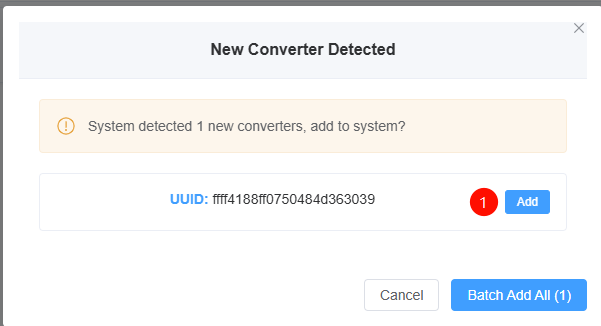
Add
5. Q&A
Q:No system prompt
A:1.Ensure the network segment address encoders settings are correct.
   2.Please wait for a period of time after power-on.
   3.Confirm the Ethernet cable connection.
6. Technical support
- Technical support email:technical@effortled.com
No comments to display
No comments to display